05 APR 2025 · 7 MIN READ
Client-Server Architecture and Network Protocols
A comprehensive exploration of client-server architecture, the TCP protocol, HTTP communication, and WebSockets, with practical examples and visual guides to understand these fundamental internet technologies.
Introduction
The internet as we know it today is built upon a fundamental architectural pattern: the client-server model. This pattern underpins virtually all online interactions, from browsing websites to sending emails and streaming videos. Understanding this model is crucial for anyone involved in web development, networking, or simply interested in how the internet works.
Basic understanding of what the internet is and how computers connect to networks. No programming knowledge required for the conceptual parts.
what you'll take away
quick pointers so you know what to look for as you read:
- tcp isn't slow — connection setup is. the 3-way handshake is the tax; the connection itself persists until network failure or explicit close.
- tcp moves bytes, http gives them meaning. protocols layer — tcp is the courier, http is the language both sides agree on.
- http/1.1 pays a connection tax. nearly every request wants a fresh connection —
Connection: keep-aliveexists to dodge that. - you can speak http by hand. netcat plus a few typed lines is a complete request — it's just text.
- protocol choice follows the communication need. simple retrieval → http, realtime → websockets, constrained devices → mqtt.
The Client-Server Model Explained
What Is The Client-Server Model?
The client-server model is the most common way for two machines to communicate over a network. Think of it like a restaurant: customers (clients) make orders, and the kitchen (server) prepares and delivers the food.
In technical terms:
- Client © : The machine or application that demands services or resources
- Server (S) : The machine or application that fulfills these demands by doing the requested job
This relationship can be visualized as:

Common Examples
In daily internet usage, client-server interactions include:
- Requesting profile information from a social media site
- Deleting a post you made
- Spinning up a cloud server instance
- Loading a webpage
- Sending an email
All these communications happen over network connections using standardized protocols.
Network Protocols: How Machines Talk
TCP: The Internet's Reliable Courier
TCP (Transmission Control Protocol) is used in approximately 99.99% of network communications. It's like a reliable postal service that ensures your mail arrives intact and in the correct order.
TCP was developed in the 1970s by Vint Cerf and Bob Kahn, who are often referred to as the "Fathers of the Internet."
Key Properties of TCP
- Connection Establishment : Requires a 3-way handshake to set up a connection
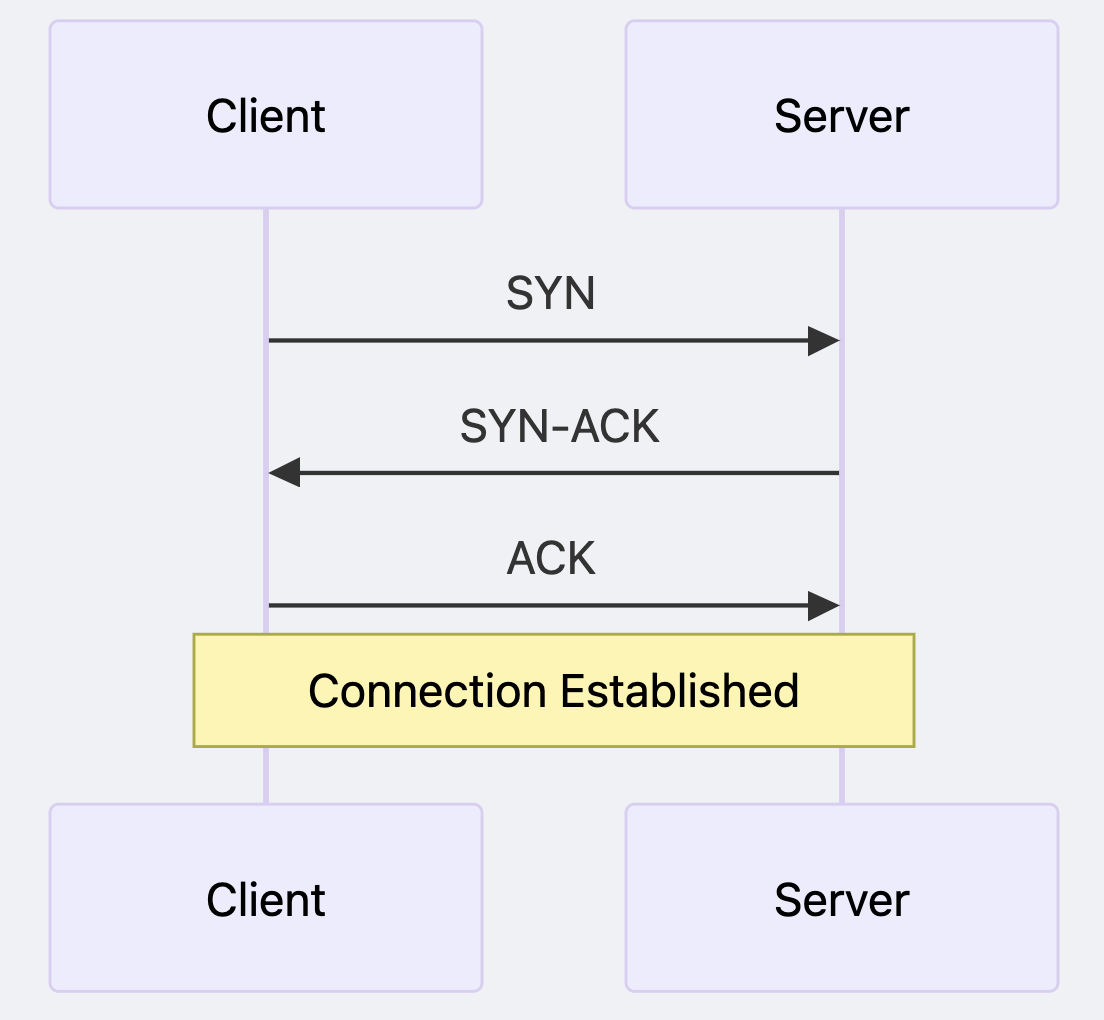
Connection Termination : Uses a 2-way handshake for teardown
Connection Persistence : TCP connections don't break immediately after data exchange
- Breaks only due to network interruptions
- Or when explicitly terminated by client/server
- This means connections can remain open "almost forever"
Many people think TCP is slow, but the slowness isn't inherent to TCP itself. Rather, it's the connection establishment overhead that adds latency when creating many short-lived connections.
✽ RECALL people say "tcp is slow" — what's actually slow, and what does that imply about how you should use connections?
the data transfer isn't slow; the 3-way handshake to establish each connection is the overhead. and since a tcp connection has no built-in expiry — it breaks only on network interruption or explicit close — the move is to set it up once and reuse it, instead of paying the handshake for every short-lived exchange.
UDP: The Quick but Unreliable Alternative
While not covered extensively in our content, it's worth mentioning that UDP (User Datagram Protocol) is the alternative to TCP. It's sometimes called the "fire and forget" protocol because it doesn't guarantee delivery or ordering of packets.
HTTP: The Web's Communication Language
TCP itself doesn't dictate what data can be sent over a connection - it's merely the transmission mechanism. The actual format of the data is determined by higher-level protocols, with HTTP being the most common for web communications.
HTTP as a Protocol
HTTP (Hypertext Transfer Protocol) is just a format that both client and server understand. It's the language of the web.
- You can define your own protocol format, but HTTP is standardized
- HTTP comes in versions: 1.1, 2, and 3, with 1.1 still being widely used
HTTP 1.1 Properties
- TCP Foundation : For client and server to communicate via HTTP 1.1, they first need to establish a TCP connection
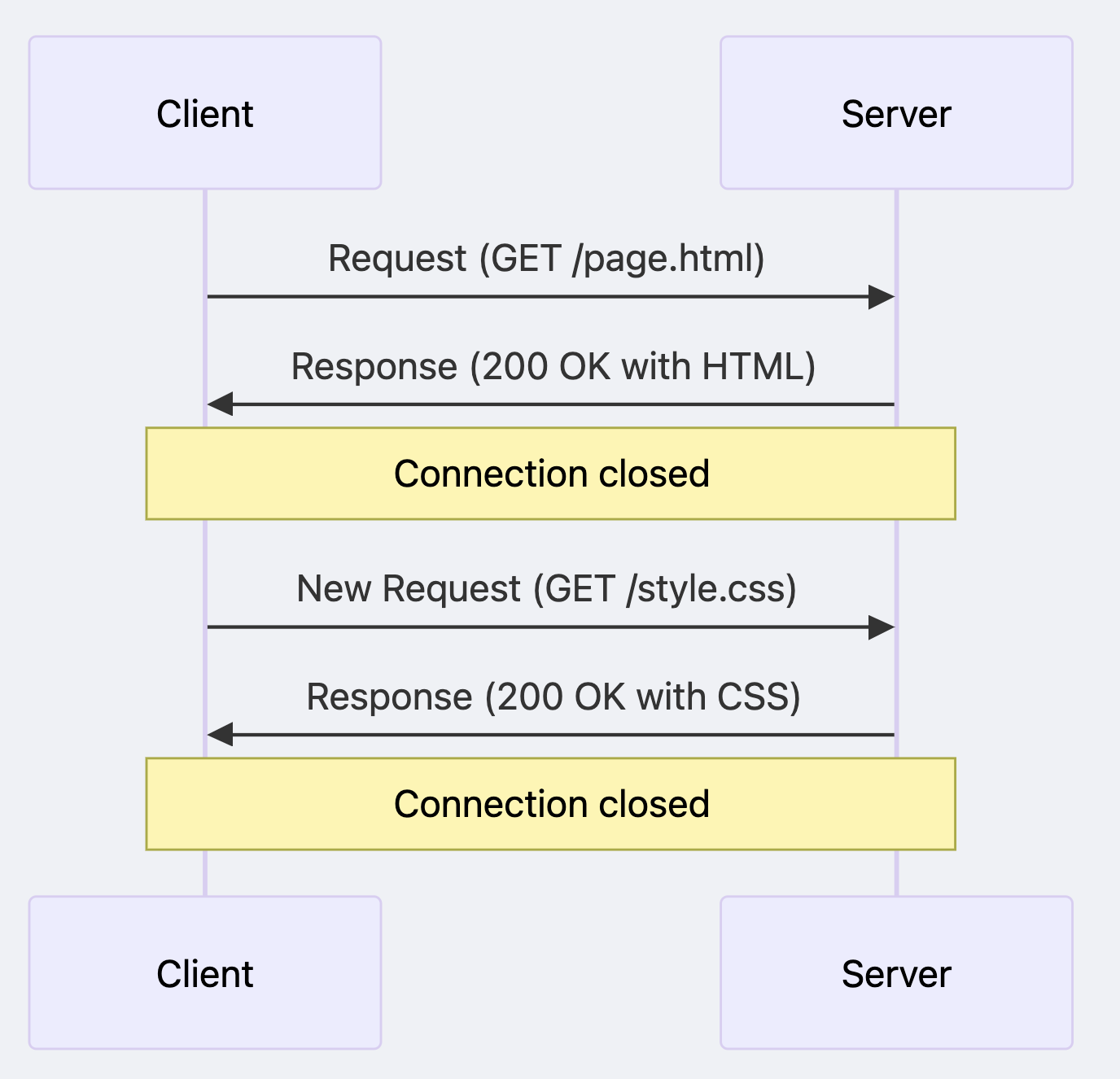
- Connection Lifecycle : The connection is typically terminated once a response is sent to the client
- Connection Overhead : Almost every request/response pair requires a new connection
- This is relatively expensive in terms of network resources
- Hence the development of optimization techniques
- Keep-Alive Header : To improve efficiency, the "Connection: Keep-Alive" header can be used
- This tells both client and server not to close the connection
- Whether this is honored depends on if the server follows this request
The traditional HTTP request-response cycle looks like this:
✽ RECALL tcp already delivers bytes reliably — so what does http add, and why does Connection: keep-alive exist?
tcp says nothing about what the bytes mean; http is the standardized format both sides agree on for requests and responses. but http/1.1 typically closes the connection after each response, so every exchange re-pays the handshake. keep-alive asks both sides to hold the connection open and reuse it — though whether it's honored is up to the server.
WebSockets: Real-time Communication
WebSockets solve a fundamental limitation of HTTP: the inability of servers to proactively send data to clients.
Key Features of WebSockets
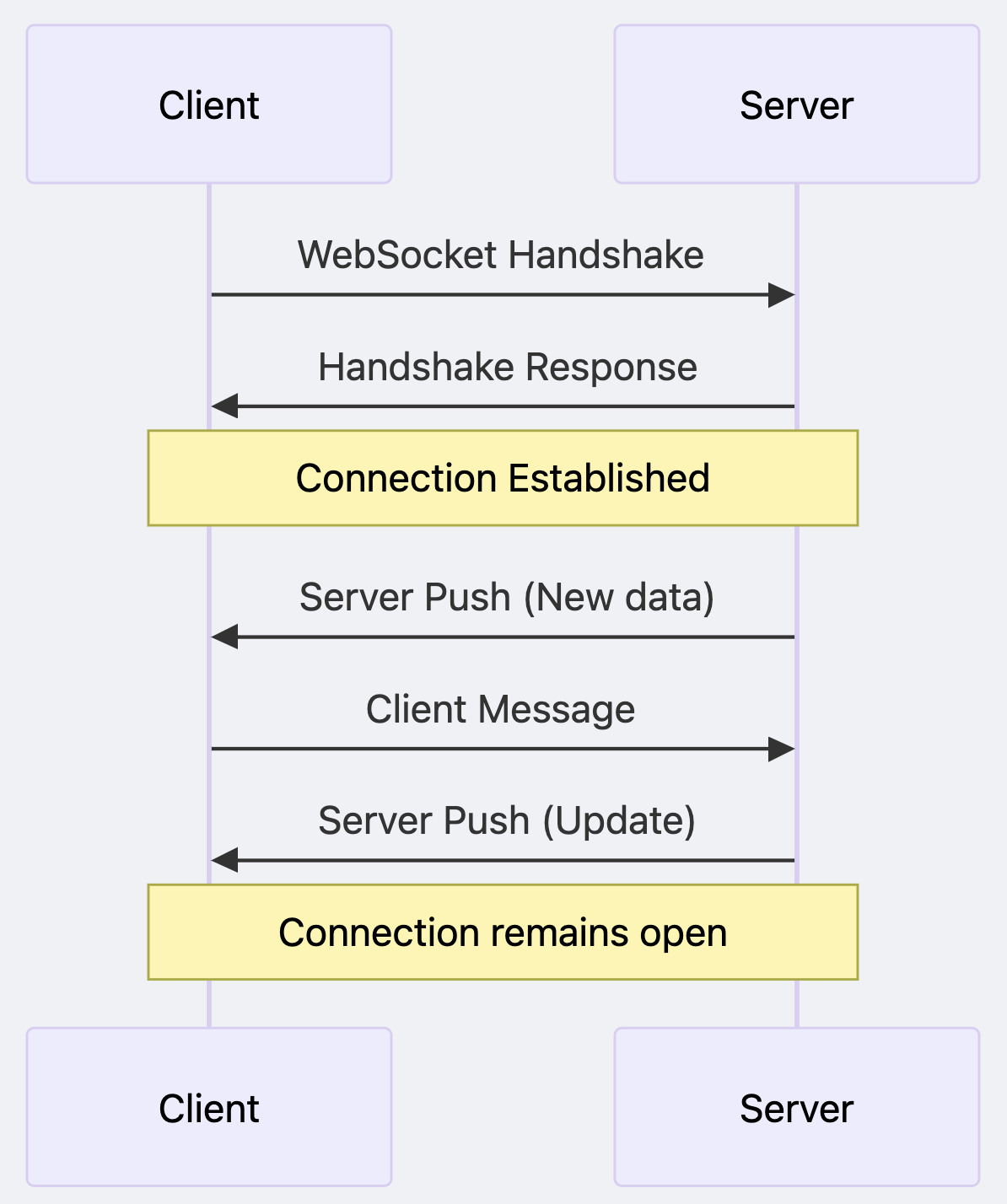
- Bi-directional Communication : Server can proactively send data to the client without the client asking for it
- Connection Efficiency : No need to set up TCP connections repeatedly
- Low Latency : Results in very low latency communication, ideal for real-time applications
The WebSocket communication model looks like this:
Use Cases for WebSockets
WebSockets are ideal when you need "realtime" or "low latency" communication:
- Chat applications
- Real-time likes on live streams
- Stock market tickers
- Collaborative editing tools
- Online gaming
- Any application requiring immediate updates without polling
Practical Implementation: Understanding HTTP with Netcat
For those who want to see HTTP in action at a low level, we can use netcat to manually establish TCP connections and send raw HTTP requests.
Basic HTTP GET Request with Netcat
# Establish TCP connection to a web server
netcat localhost 3000

# Then type this HTTP request and press enter twice
GET /hello HTTP/1.1
Host: localhost
The server will respond with an HTTP response like:
HTTP/1.1 200 OK Content-Type: text/plain Content-Length: 13 Date: Mon, 24 Mar 2025 10:00:00 GMT
Hello, World!
HTTP POST Request with JSON Data
# Establish TCP connection
netcat localhost 3000

# Then type this HTTP request with JSON body
POST /save HTTP/1.1
Host: localhost
Content-Type: application/json
Content-Length: 30

{"id": 1092, "name": "John"}
✽ RECALL how would you prove to someone that http is "just text over tcp"?
open a raw connection with netcat, type a request line (GET /hello HTTP/1.1), a Host header, hit enter twice — and read the response that comes back. no library, no browser, no magic: the entire protocol is human-typeable text flowing over an ordinary tcp connection.
Advanced Considerations and Best Practices
When to Use Which Protocol
| Communication Need | Best Protocol Choice | Reason |
|---|---|---|
| Simple data retrieval | HTTP | Simplicity, wide support |
| File downloads | HTTP | Reliability, resumability |
| Real-time updates | WebSockets | Low latency, persistent connection |
| Gaming/Chat | WebSockets | Bi-directional, minimal overhead |
| IoT devices (limited resources) | MQTT over TCP | Lightweight, efficient |
Security Considerations
- HTTP is unencrypted by default; HTTPS adds TLS encryption
- WebSockets can be secured with WSS (WebSocket Secure)
- Always validate and sanitize data on both client and server sides
✽ RECALL when do you reach for plain http vs websockets vs something like mqtt?
match the protocol to the shape of the communication. simple retrieval and file downloads want http — simple, universally supported, resumable. realtime bidirectional traffic (chat, gaming, live updates) wants websockets — persistent and low latency. resource-constrained iot devices want something lightweight like mqtt over tcp. the need dictates the protocol, not fashion.
Summary and Further Learning
The client-server model and its associated protocols form the backbone of internet communications. Understanding these concepts helps in:
- Debugging network issues
- Designing efficient web applications
- Making informed architecture decisions
- Optimizing performance
- How does HTTP/2 improve upon HTTP/1.1?
- What are the trade-offs between server-sent events and WebSockets?
- How do microservices architectures extend the client-server model?
Additional Resources
For deeper exploration of these topics, consider these resources:
- HTTP Working Group
- WebSockets API Documentation
- Understanding HTTP Protocol Using Netcat
- RFC 2616: HTTP/1.1 Specification
- RFC 6455: WebSocket Protocol
"The nice thing about standards is that you have so many to choose from." --- Andrew S. Tanenbaum