07 SEPT 2025 · 9 MIN READ
How DNS Really works and How it scales infinitely
Why should we care about DNS? Because it's one of the most beautiful pieces of software ever written - it made the internet what it is possible today by giving a human-readable name to every single thing out there, not requiring us to remember weird IP addresses of machines. But here's the thing: most people think DNS is just "domain name to IP address lookup." That's like saying the internet is just "computers talking to each other." The real story is way more interesting.
what you'll take away
quick pointers so you know what to look for as you read:
- dns is not a lookup table, it's a hierarchy. no single machine knows everything — each step takes you closer to the one that does.
- a centralized dns database is impossible. volume of data, volume of queries, and every update funneling through one system that can never go down.
- authoritative name servers are the source of truth. the entire resolution dance exists just to find the one that owns your zone.
- records are typed mappings. A records map names to ips, CNAMEs map names to names — and the resolver chases the chain.
- caching at every layer is the secret sauce. most lookups never leave your local network, and root servers barely get touched.
The Fundamental Problem DNS Solves
To connect to any machine on the internet, you need its IP address. When you type www.google.com in your browser, what your browser actually needs is the IP address to establish that TCP connection. But how do we discover that google.com → 17.53.21.253?
So there would be a place where this mapping is stored - somewhere this particular mapping needs to be configured: www.google.com means 17.53.21.253. This is typically the A record or the CNAME record in the DNS configuration.
Why do we need DNS records at all? Because we need to store different types of mappings, not just domain-to-IP.
A Record - Maps a domain name directly to an IPv4 address:
www.google.com → 17.53.21.253CNAME Record - Maps a domain name to another domain name (alias):
blog.google.com → www.google.comThink of CNAME as a redirect. When someone looks up blog.google.com, DNS says "actually, go look up www.google.com instead."
✽ RECALL when would you configure a CNAME instead of an A record, and what does the resolver do when it hits one?
an A record pins a name to an ipv4 address; a CNAME aliases a name to another name, so when the target's ip changes you update one record instead of many. the resolver treats a CNAME as a redirect — "go look up this other name instead" — and keeps resolving until it lands on an actual address.
DNS Zones: The Logical Foundation
A DNS Zone is like a database table that contains all the DNS records for a particular domain and its subdomains.
Example zone file for google.com:
google.com.        A      17.53.21.253
www.google.com.    A      17.53.21.253
mail.google.com.   A      74.125.224.83
blog.google.com.   CNAME  www.google.com
Why zones? Organization and delegation. Google manages everything under google.com in their zone, while university.edu manages their own zone separately.
Cloud Providers:
- AWS Route 53 - Amazon's DNS service
- Google Cloud DNS - Google's DNS service
- Azure DNS - Microsoft's DNS service
- Cloudflare DNS - Also provides CDN services
Traditional DNS Providers:
- GoDaddy DNS - Comes free with domain registration
- Namecheap DNS - Free with domains
- DNSimple - Paid DNS hosting specialist
- NS1 - Enterprise DNS provider
Free Options:
- Cloudflare - Free tier available
- Hurricane Electric - Free DNS hosting
If you're using AWS, you'd configure this in Route 53 as a hosted zone. This zone contains everything about google.com - all the mappings, all the subdomains, all the different record types.
Authoritative Name Servers: The Source of Truth
Authoritative Name Server = The server that actually stores and serves your DNS zone data.
Zones are served via Authoritative Name Servers. An authoritative name server hosts multiple zones, and it answers DNS questions for the zones it owns.
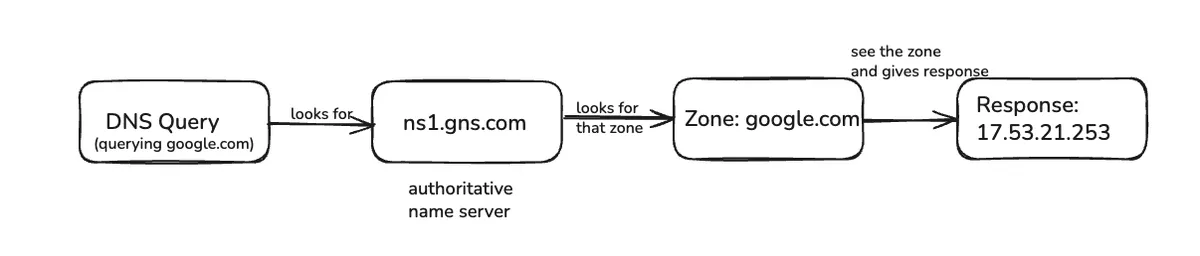
These servers typically look like ns1.gns.com, ns2.gns.com, ns3.gns.com - usually offered by cloud providers like GoDaddy, Namecheap, or AWS. When you buy a domain, you configure which name servers should handle it.
Here's the key insight: if you somehow know the authoritative name server's address, you can get the record you're looking for. But how does your browser know which name server to ask?
✽ RECALL what makes a name server "authoritative", and why is the whole resolution process really just a hunt for one?
an authoritative name server actually hosts the zone — it stores the records and answers for the zones it owns, no guessing, no cache. if you already knew its address you could ask it directly and be done; the entire hierarchy of root and tld servers exists only because you don't, and each step just points you closer to it.
The Two Approaches: Centralized vs Decentralized
Let's think about this problem. How would we reach these authoritative name servers?
Option 1: The Centralized Database
Let there be a single massive "database" system that everybody reaches out to when they want DNS information.
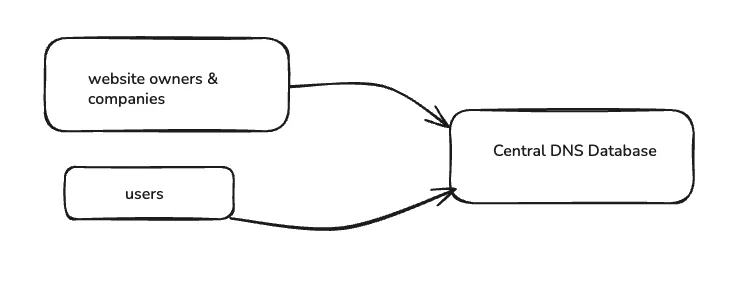
This centralized way is not scalable, fault tolerant, or even manageable. Think about the concerns: volume of data, number of requests and updates, and any change in any info needs to be communicated to this single system.
If this goes down, the entire internet is down. The sheer volume of requests it would need to handle and the amount of data it would need to store makes this approach impossible.
Option 2: Decentralized Approach - No One Machine Knows It All
This is where the beauty of DNS architecture comes in. The world went with decentralization where no single machine knows everything.
✽ RECALL why can't dns be one giant centralized database that everyone queries?
it fails on every axis — the volume of data, the volume of reads and updates, every change in the world funneling through one system, and a single point of failure that would take the whole internet down with it. so dns went decentralized: no one machine knows it all, but each machine knows enough to send you one step closer.
DNS Resolvers: Your Gateway to the System
DNS Resolver is a server that carries out the resolution of Domain Name to IP address. Where does this DNS resolver run?
Typically runs at ISP, but you can run your own locally. Most home routers are real DNS resolvers. You can check yours by running:
ipconfig /all    # Windows
# Look for DNS Servers entry
On my machine, I get 192.168.0.1 - that's my router doing DNS resolution for me. You can change this to popular DNS resolvers like:
- Google :
8.8.8.8 - Cloudflare :
1.1.1.1
Root Name Servers: The Foundation of the Internet
Think about this chicken-and-egg problem: To find any website, you need to ask a DNS server. But how do you find the DNS server's address? You'd need DNS to find DNS!
Root Name Servers solve this bootstrap problem. They're the "starting point" that everyone agrees on.
Here's where it gets really interesting. Say we are looking for www.google.com - we need to reach its Authoritative Name Server, but we do not know where it is!
Calls to Root NS are infrequent, because even IP of TLD (Top-Level-Domain) servers does not change often, so it is heavily cached.
✽ RECALL why do resolvers almost never actually hit the root name servers?
the root only tells you where the tld servers are, and tld server addresses barely ever change — so that answer gets cached heavily and reused for days. the root is the bootstrap starting point everyone agrees on, not a server in the hot path.
The Complete DNS Resolution Process
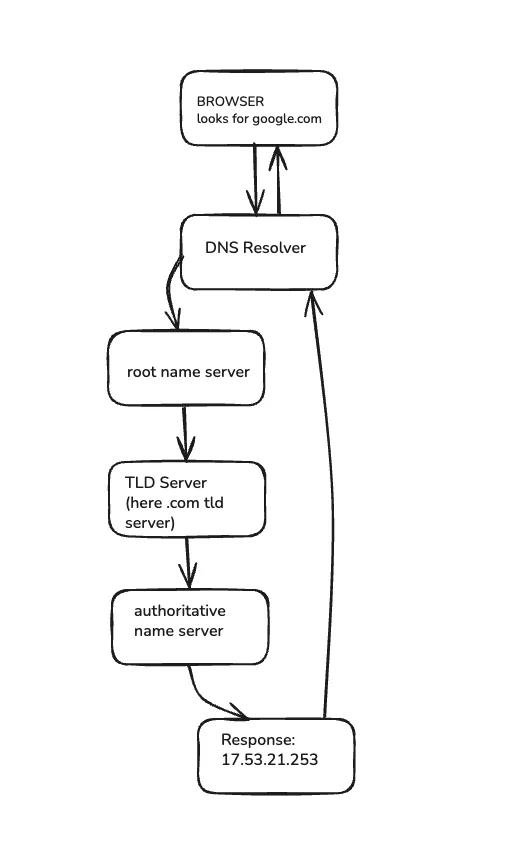
Now, how does the DNS resolution process actually work? Let's walk through it step by step, assuming nothing is cached:
Putting It All Together
- You buy
mysite.comfrom GoDaddy (registrar) - GoDaddy registers your domain with
.comTLD servers - By default , GoDaddy's name servers become authoritative for your zone
- You can change to use AWS Route 53 instead
- Your DNS zone contains A records, CNAME records, etc.
Step by Step Resolution
1. Query to Root Name Server When queried for Domain Name, it responds with IP address of server handling the TLD (e.g., .com, .in, .edu, etc.)
2. Query to TLD Server The .com TLD server responds with the authoritative name server that owns the zone google.com
3. Query to Authoritative Name Server Because it owns the corresponding zone, it can respond with what's configured against www.google.com, which is the IP address 17.53.21.253
4. Browser Connection Your browser gets the IP address, establishes TCP connection to the load balancer, sends HTTP request, gets response - and that's how you see Google's homepage.
✽ RECALL walk through resolving www.google.com from a totally cold cache — who do you ask, and what does each server actually tell you?
the resolver asks a root server, which points to the .com tld servers; the tld server points to the authoritative name server that owns the google.com zone; the authoritative server returns the record configured against www — the actual ip. nobody answers the question directly except the last hop; everyone else just delegates you one level down.
The Caching Strategy: How DNS Scales Infinitely
Here's the secret sauce: each machine takes us closer to machine that knows it.
Denotes caching - This information is cached for a few hours across multiple layers:
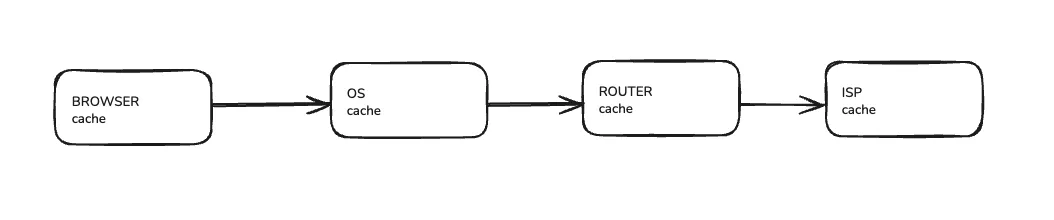
The recursion continues from Google Name Server to Authoritative Name Server of domain zone google.com. Then it checks the record against www, which may point to a load balancer, and it then resolves to the IP of the load balancer.
Key insight: The beauty of DNS is that it's a step-by-step resolution process. You go to .com TLD, they give you google.com authority, you go to that and say "Give me www.google.com" - it's hierarchical resolution that scales infinitely.
✽ RECALL what's the actual mechanism that lets dns scale "infinitely"?
hierarchy plus caching. the hierarchy splits the namespace so each server only owns its slice, and every answer along the chain gets cached — browser, os, resolver — for hours. so most lookups never leave the local network, and the higher you go up the hierarchy the less traffic ever arrives.
Why This Architecture Is Brilliant
The DNS architecture solves several critical problems:
Infinite Scalability - No single point of failure, distributed globally with heavy caching at every layer.
Fault Tolerance - Multiple servers at each level, anycast distribution, and redundant authoritative name servers.
Human Usability - We remember google.com instead of 17.53.21.253.
Decentralized Management - Organizations control their own zones without depending on a central authority.
Performance - Heavy caching means most DNS lookups never leave your local network.
This is one of those systems where the more you understand it, the more you appreciate how elegantly it solves an impossibly complex global coordination problem. The fact that typing any domain name anywhere in the world just works - that's the magic of DNS.
Note: In upcoming content, I'll be building my own DNS server to show you exactly how this protocol works under the hood.