11 MAY 2026 · 5 MIN READ
noVNC and websockify
aight, let's talk about remote desktops and why the web makes everything complicated (but also kinda cool).
what you'll take away
quick pointers so you know what to look for as you read:
- vnc is just a protocol over tcp. server captures the screen, client sends input — and only the changed pixels ship.
- browsers can't open raw tcp connections. sandboxed to http and websockets — that one constraint shapes the whole architecture.
- websockify is a dumb translator, and that's the point. unwrap websocket frames, forward raw tcp, wrap responses back.
- neither end knows the other's world exists. the vnc server sees plain tcp, novnc speaks pure websocket.
- build bridges, don't rebuild systems. respecting each layer's constraints beats changing everything.
what even is vnc?
your first question should hit you: what is vnc? well, it's a remote desktop protocol - think of it like http or websocket but for controlling computers remotely. vnc (virtual network computing) lets you control one computer from another over a network. dead simple concept.
so basically you get this magic remote control for any computer. wanna fix your mom's laptop from across the country? vnc. need to check on that long-running script on your server while you're at starbucks? vnc. it's been around since like the 90s and just works.
how does vnc work?
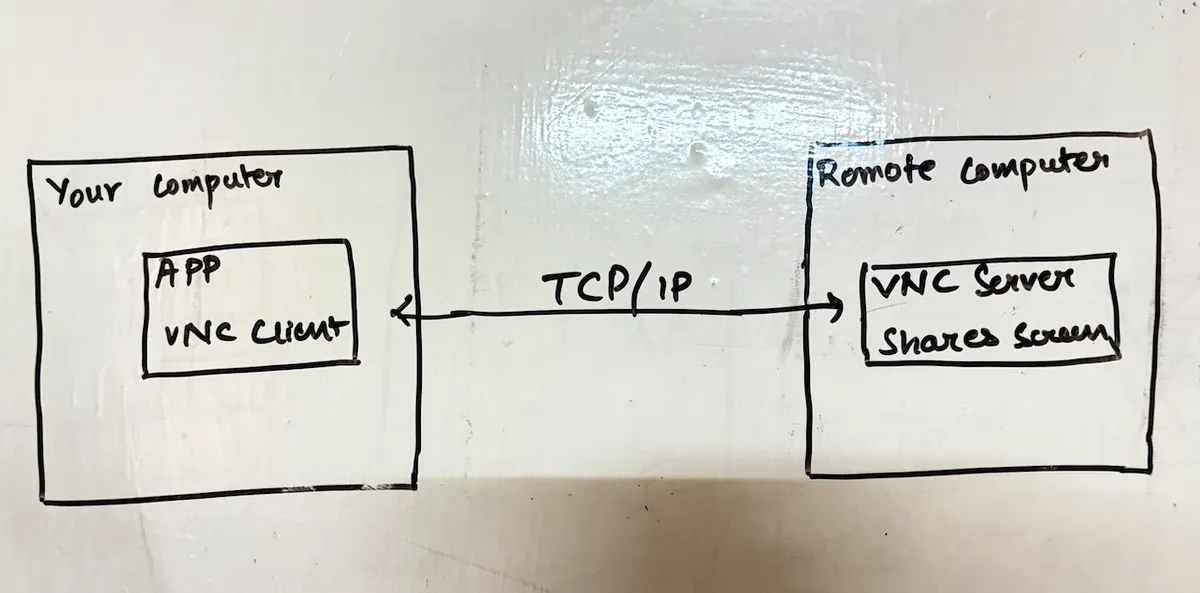
the setup is straightforward. you've got a vnc server running on the remote computer - the one you want to control. this server captures everything: screen updates, what's happening on the desktop, all that visual stuff. then on your local machine, you run a vnc client that displays those screen updates and sends your keyboard/mouse actions back to the server.
here's the important bit: all this communication happens over a tcp connection. remember that - yep fr remember that. the protocol itself is pretty efficient too. instead of sending the entire screen every time, vnc just sends what changed. move a window? only that rectangle gets updated. type some text? just those pixels change.
✽ RECALL how does vnc keep remote-desktop traffic small enough to be usable?
it never resends the whole screen — only the regions that changed. move a window and just that rectangle ships; type and only those pixels update. all of it flows over one persistent tcp connection: the server captures and diffs the screen, the client renders updates and sends keyboard/mouse input back.
then what is novnc?
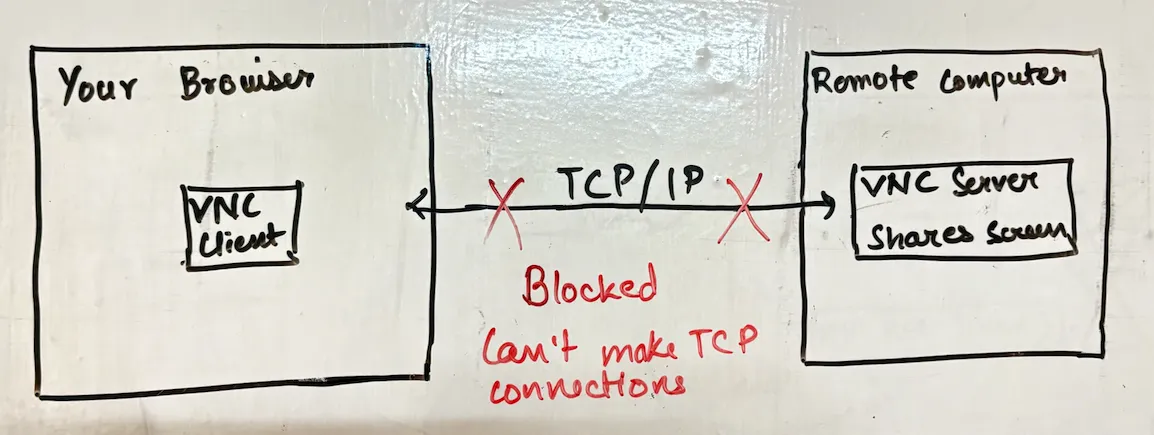
so here's where things get interesting. what if you want to access that remote desktop from a web browser? seems reasonable right? well, browsers have this annoying (but important) limitation: they can't make direct tcp connections. security reasons. browsers can only do http requests and websocket connections.
this is where novnc enters the chat. it's a javascript library that implements a full vnc client entirely within your web browser. uses html5 canvas for display, handles all the vnc protocol stuff in javascript. pretty impressive tbh. but wait - if browsers can't do tcp and vnc servers only speak tcp, how does novnc connect to anything?
spoiler: it can't. not directly anyway.
✽ RECALL novnc implements a complete vnc client in javascript — so why can't it talk to a vnc server on its own?
browsers can't open raw tcp connections — the sandbox limits them to http requests and websockets, for good security reasons. vnc servers only speak tcp. so you've got a fully capable client and a fully capable server with no shared language between them; something in the middle has to translate.
enter websockify: the protocol translator
the solution is websockify - a proxy server that acts as a translator between the web world and traditional networking. think of it as a universal adapter but for protocols.
websockify sits in the middle doing this translation dance:
- receives websocket connections from browsers running novnc
- extracts the vnc protocol data from those websocket frames
- forwards it as raw tcp packets to the actual vnc server
- when the vnc server responds with screen updates, websockify wraps that data back into websocket frames
- sends them back to the browser
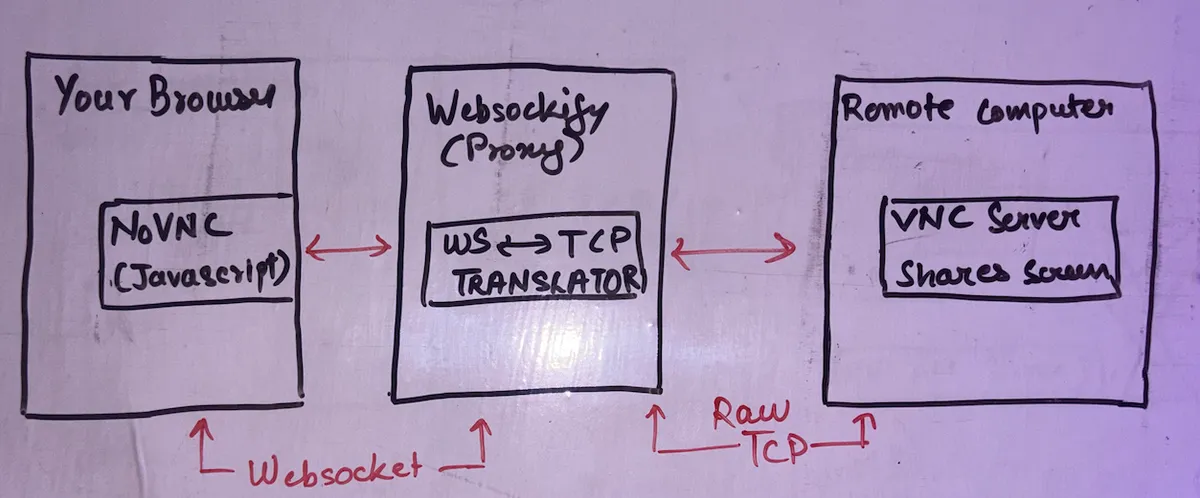
the beautiful thing is neither end needs to know about the other's world. the vnc server has no idea websockets even exist - it just sees regular tcp connections. novnc doesn't need to worry about tcp sockets - it just speaks websocket to websockify.
✽ RECALL what does websockify actually do with each message, and why does neither end need modification?
it unwraps vnc data from incoming websocket frames and forwards it as raw tcp to the vnc server; responses get wrapped back into websocket frames for the browser. the vnc server just sees ordinary tcp connections, novnc just speaks websocket — each side stays in its native world while the proxy quietly translates between them.
putting it all together
so when you set up web-based remote desktop, here's what you're actually running:
- vnc server on the target machine (the one you want to control)
- websockify as a proxy - often runs on the same server, listening on port 6080
- novnc html/javascript files served to users' browsers
when a user connects, their browser loads novnc, which opens a websocket to websockify. websockify then connects to the vnc server via tcp. boom - you're controlling a remote desktop through nothing but a web browser. no plugins, no java applets (remember those? lol), no special software to install.
the whole setup enables some pretty powerful use cases. cloud providers use this for console access to vms. support teams can help users without installing anything. you can access your home lab from any computer with a browser. hell, you could probably run it on your phone if you hate yourself enough.
what i find neat about this architecture is how it respects the constraints of each layer. browsers stay in their sandbox, vnc servers don't need modifications, and websockify just quietly translates between them. it's a reminder that sometimes the best solution isn't changing everything - it's building a good bridge.
nothing revolutionary here, just good engineering solving a real problem. and now you can remote desktop from literally anywhere with a browser. pretty cool for technology that's essentially duct-taping protocols together.
✽ RECALL you need browser access to a system that only speaks a raw tcp protocol — what's the general pattern?
put a protocol-translating proxy in the middle, the websockify way: the browser speaks websocket to the proxy, the proxy speaks tcp to the legacy system. it respects each layer's constraints — the browser stays sandboxed, the server stays unmodified — which usually beats rewriting either end. build a good bridge instead of changing everything.